
The iPhone alarm represents a critical component of the modern digital lifestyle. Since the original launch in 2007, this tool has transitioned from a basic utility to a complex ecosystem. Millions of global users rely on this hardware and software integration daily. Consequently, any failure in this system impacts professional and personal productivity.

Apple first introduced the Clock app with iPhone OS 1.0. This early version established the foundational multi-touch interface for timekeeping. However, the underlying technology has evolved significantly over nineteen major software versions. Today, the system manages sophisticated interactions between hardware sensors and artificial intelligence.
Recent developments show a focus on aesthetic fluidity and user intention. Specifically, the introduction of the Liquid Glass design language marks a visual turning point. Therefore, understanding the intersection of these advancements and reliability is essential for power users. This report explores the technical nuances of the current alarm environment.
Historical Milestones and Operating System Architecture
The transition from “iPhone OS” to “iOS” happened with version 4 in 2010. This shift reflected the broader capabilities of the growing mobile platform. Meanwhile, the Clock app remained a central fixture of the user experience. Each update added incremental features to improve scheduling and global time awareness.
By 2019, iOS 13 introduced a separate operating system for the iPad. This allowed the iPhone version to focus on mobile-centric utility and notification management. Consequently, the alarm system began to benefit from more specialized power management and audio routing protocols. However, complexity also introduced new potential for software conflicts.
Apple moved to a year-based naming convention with the release of iOS 26 in 2025. This change aligned the mobile software with the current calendar year. Notably, this version brought the first major user interface redesign since the launch of iOS 7. Thus, the system now balances historical reliability with cutting-edge visual materials.
Hardware Foundations: Audio and Haptic Engineering
Hardware capabilities directly influence the effectiveness of morning alerts. The iPhone 15 Pro Max utilized the A17 Pro chip for efficient background processing. It featured Dolby Atmos-tuned spatial audio to deliver immersive and clear alert tones. This hardware ensured that alarms could cut through ambient bedroom noise.
The iPhone 16 Pro Max introduced a larger 6.9-inch display and the A18 Pro chip. It maintained dual-speaker arrays for consistent stereo output in landscape or portrait orientation. Additionally, the device utilized a second-generation Ultra Wideband chip for precise spatial awareness. These components work together to manage how sounds propagate in various environments.
Haptic feedback provides a silent but physical waking mechanism through the Taptic Engine. The iPhone 16 series includes advanced haptic touch capabilities on its Super Retina XDR display. Therefore, users can rely on precise rhythmic vibrations even if they mute the audible sound. This multi-sensory approach increases the probability of a successful wake-up event.
The Silent Alarm Bug: 2024 to 2026 Analysis
A widespread “silent alarm” bug began affecting global users in late 2024. This glitch caused alarms to activate visually without triggering any audible sound. Meanwhile, many users reported oversleeping during critical work or school hours. Apple acknowledged the issue but initially provided limited technical explanations.
The problem persisted into 2026 despite multiple software patches. Analysts suggest that multiple causes likely contribute to these auditory failures. For instance, a particular iOS version might fix the bug only for it to return later. Consequently, the reliability of the native Clock app has become a topic of significant debate.
Troubleshooting often involves checking the Ringtone and Alerts slider in Settings. However, some software bugs bypass manual volume overrides entirely. Users must also ensure that the “Change with Buttons” toggle is configured correctly. Therefore, maintaining consistent volume requires a deep dive into the Sounds and Haptics menu.
Hardware Comparison: Flagship Speaker and Audio Specifications
| Model | Chipset | Display Size | Max Brightness | Audio Technology |
| iPhone 15 Pro Max | A17 Pro | 6.7″ | 2000 nits | Dolby Atmos |
| iPhone 16 Pro Max | A18 Pro | 6.9″ | 2000 nits | Spatial Audio |
| iPhone 17 Pro Max | A19 Pro | 6.9″ | 3000 nits | Stereo Speakers |
Attention-Aware Features and Auditory Muting
The Attention-Aware feature is a primary suspect in the silent alarm crisis. This system uses the Face ID sensor to detect if a user is looking at the phone. If detected, the iPhone automatically lowers the volume of all incoming alerts. Consequently, the device mistakenly silences alarms if it incorrectly perceives user attention.
Users can disable this feature under the Face ID and Passcode settings. This ensures that the phone does not lower the volume during the night. Notably, this workaround solved the problem for many users when it first surfaced in 2024. However, the root cause within the Face ID algorithm remains complex.
The system sometimes continues to lower volumes even after a user stops looking at the screen. This suggests a lag in sensor processing or a software logic error. Meanwhile, the feature remains useful for managing distractions while the user is actually awake. Therefore, balancing convenience and alarm reliability remains a primary challenge for Apple engineers.
StandBy Mode: Impact on Bedside Timekeeping
iOS 17 introduced StandBy mode to transform the iPhone into a bedside smart display. This mode activates when the phone is charging and positioned on its side. It offers high-contrast widgets for clocks, photos, and live activities. However, this low-power state may interfere with standard notification delivery.
Some reports indicate that StandBy mode can cause alarms to be delayed or silenced. This likely happens because the system prioritizes display efficiency over high-priority audio interrupts. Therefore, users should test their alarms with StandBy enabled before relying on it exclusively. If issues occur, turning off the StandBy toggle is a recommended fix.
Night Mode within StandBy applies a red tint to the screen in low light. This prevents sleep disruption by reducing blue light exposure during the night. Additionally, the “Motion to Wake” setting allows the screen to turn on only when detected. These features enhance the nightstand experience without compromising the core utility.
Audio Routing and Bluetooth Connection Conflicts
Bluetooth connectivity often causes unexpected changes in iPhone alarm audio routing. If an iPhone remains connected to headphones, the alarm may play through those external speakers. Consequently, a user who is not wearing their earbuds will miss the alert entirely. Disconnecting all peripherals before sleep is a vital preventive measure.
Legacy software bugs sometimes fail to prioritize internal speakers for high-priority alarms. While Apple typically designs alarms to play through the phone speaker, routing errors can occur. Therefore, toggling Bluetooth off entirely provides the most reliable environment for morning wake-up calls. This ensures that the system has only one possible audio destination.
External speakers and AirPods can also become stuck in a “connected” state. This happens even when the user places the devices in their charging case. Meanwhile, the iPhone software may still route system alerts to the inactive device. Consequently, manual verification of the active audio output is a prudent habit for users.
Resetting and Re-creating Corrupted Alarm Data
Corrupted software settings can lead to persistent failures in the Clock app. Specifically, repeating alarms may develop data errors over many months of use. Deleting all existing alarms and creating new ones is a proven troubleshooting step. This process clears any invalid configuration files associated with the scheduling system.
Users should also check for accidentally set PM times instead of AM times. This simple error is a common cause for perceived alarm failures in the morning. Additionally, deleting old shortcuts or automations that affect volume can resolve hidden conflicts. Therefore, a clean state in the Clock app often restores full functionality.
If basic resets fail, a full factory restore may be the final option. This restores the entire iOS filesystem to its original state and removes deep bugs. However, users must perform a full backup to avoid losing personal photos and messages. Thus, the severity of the alarm bug determines the level of intervention required.
Siri’s Changing Logic: Alarms versus Timers
Siri remains a primary way many users interact with their morning schedules. However, a shift in command interpretation started with the release of iOS 17. If a user asks for an alert in “30 minutes,” Siri now sets a timer. Conversely, creating an alarm requires the mention of a specific time of day.
This change has frustrated some long-time users who prefer the snooze feature of alarms. Timers do not offer a snooze option, which can lead to oversleeping for heavy sleepers. Consequently, users must be very precise when speaking to the digital assistant. Treating Siri as a “precision-obsessed chef” is now a common recommendation.
Apple Intelligence promises to improve how Siri understands complex contextual requests in the future. However, the full rollout of these advanced features has faced delays into 2026. Meanwhile, the current system still relies on strict keyword matching for timekeeping commands. Therefore, users must adapt their speech patterns to ensure the correct tool activates.
Apple Intelligence and Notification Summarization
Apple Intelligence is integrated deeply into iOS 26 to manage daily workflows. One of its key features is the ability to summarize long notification stacks. Users can quickly read a brief overview of messages received during the night. Consequently, the morning routine becomes more efficient as users prioritize their responses.
Priority Notifications now appear at the top of the Lock Screen for immediate attention. This system uses on-device machine learning to identify urgent emails or calendar events. Therefore, users are less likely to miss critical information amidst a sea of casual updates. This intelligent sorting enhances the utility of the iPhone as a personal assistant.
The “Reduce Interruptions” Focus mode further refines how notifications reach the user. It surfaces only those alerts that require immediate attention based on personal context. Meanwhile, the Neural Engine in the A18 and A19 chips powers these computations locally. Thus, Apple balances advanced intelligence with a strict focus on user privacy.
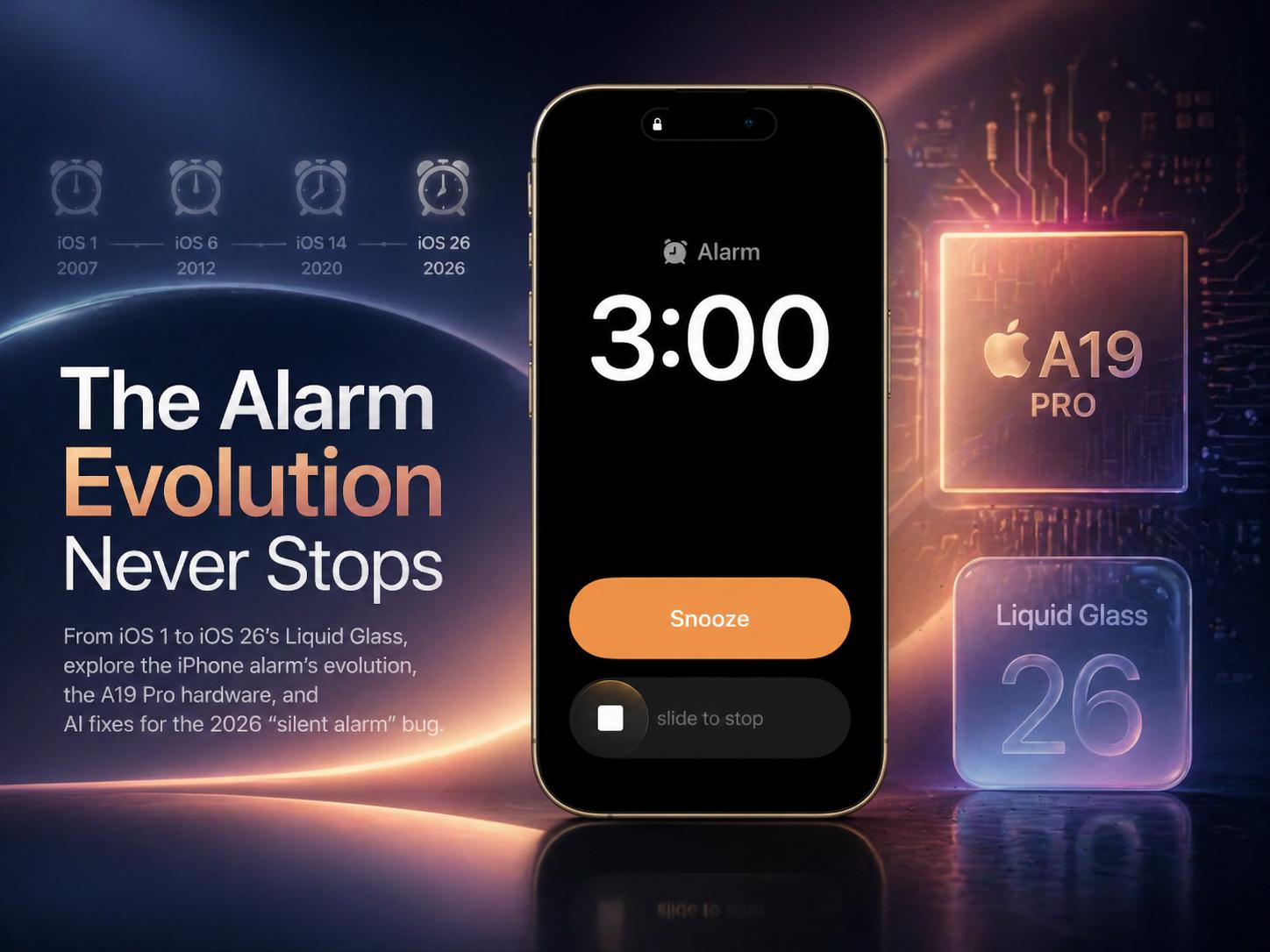
The Liquid Glass Design of iPhone Alarm
iOS 26 introduced the “Liquid Glass” design language at WWDC 2025. This material combines the optical qualities of glass with a sense of fluidity. It reflects and refracts underlying content in real-time as users interact with the interface. Consequently, the Clock app now feels more tactile and visually expressive.
Liquid Glass creates a distinct functional layer for navigation and controls. Buttons and sliders morph and expand fluidly when tapped or dragged by the user. Specifically, this design aims to bring greater focus to content while providing delightful interactions. Therefore, the simple act of setting an alarm has become a high-end visual experience.
The material responds to device motion with specular highlights and adaptive shadows. This gives the interface a three-dimensional depth that changes with the environment. Meanwhile, developers can use new APIs to adopt this design language in third-party apps. Thus, the entire iOS ecosystem is moving toward this new aesthetic standard.
Slide to Stop: A Functional Innovation in iOS 26.1
A critical functional change arrived with the release of iOS 26.1 in late 2025. Apple introduced a “Slide to Stop” interface for morning alarms to prevent accidental dismissal. Previously, users could accidentally turn off an alarm while trying to hit the snooze button. The sliding gesture requires more intention, reducing the risk of oversleeping.
This update addresses a long-standing complaint about the user interface design. In earlier versions, the “Stop” and “Snooze” buttons were too close together. Consequently, tired users often made mistakes during the early morning hours. Therefore, the new design prioritizes functional reliability over simple button interactions.
iOS 26.1 also expanded Liquid Glass support to more stock applications. This ensured a consistent look and feel across the entire operating system. Notably, these smaller refinements often have the biggest impact on daily user satisfaction. Meanwhile, Apple continues to iterate on the core mechanics of the timekeeping system.
Comparison of Native and Third-Party Alarm Apps
| App Name | Unique Feature | Cost Model | Key Waking Mission |
| Clock (Apple) | System Integration | Included | Slide to Stop (iOS 26.1) |
| Alarmy | Extreme Loudness | Subscription | Math, Photos, Squats |
| Galarm | Social Coordination | Subscription | Group/Buddy Alarms |
| Sleep Cycle | Smart Window | Subscription | Light Sleep Waking |
Third-party apps often fill gaps left by the native Clock application. For instance, Alarmy is famous for its “missions” that force users to wake up. It requires users to solve math problems or take specific photos to silence the noise. Consequently, it provides a higher level of accountability for heavy sleepers.
Galarm offers social features that allow buddies to remind each other of tasks. This coordinate-based approach is ideal for medication reminders or group outings. Meanwhile, Sleep Cycle uses the microphone to analyze sleep patterns and wake users gently. Therefore, the choice of app depends heavily on the specific waking needs of the individual.
Many third-party apps must remain running in the background to function correctly. This is a technical constraint of the iOS operating system for non-native utilities. However, these apps often provide louder or more jarring tones than the stock options. Thus, they remain popular alternatives for those who find the native app too quiet.
iPhone 17 Pro Max: Hardware and Cooling Innovations
The iPhone 17 Pro Max represents the peak of mobile hardware as of 2026. It features a new vapor chamber cooling design built into its aluminum frame. This allows for 40% better sustained performance during intensive processing tasks. Therefore, the device remains cool even when running advanced AI models for notification management.
The A19 Pro chip powers the device with increased efficiency and speed. Notably, the base model now includes 12 GB of RAM to support enhanced Apple Intelligence. This extra memory ensures that background services like alarms are never killed by the system. Consequently, the device offers a more stable platform for critical daily utilities.
The display on the Pro Max reaches an incredible 3000 nits of peak brightness. This ensures perfect visibility even in direct sunlight or bright morning environments. Additionally, the device uses a new “plateau camera” design for improved optical zoom capabilities. Thus, the hardware continues to push the boundaries of what is possible in a mobile form factor.
Security and the 2026 Notification Database Exploit
In April 2026, Apple released a critical security patch in iOS 26.4.2. This update addressed a flaw where deleted notifications were still stored on the device. Reports suggested that federal investigators used this vulnerability to access private messages. Consequently, Apple moved quickly to improve data redaction in the notification database.
This security patch was vital for maintaining user trust in the iOS ecosystem. It ensured that sensitive information from alerts was permanently erased upon deletion. Meanwhile, the update also included general bug fixes for system performance. Therefore, users are strongly encouraged to install these updates immediately to protect their privacy.
The release of iOS 26.4.2 occurred just months before the expected unveiling of iOS 27. This demonstrates Apple’s commitment to securing current versions even while developing future software. Notably, the update was also available for older devices running iOS 18.7.8. Thus, the security of the notification system remains a top priority across all supported hardware.
iPhone Alarm System: Multi-Device Synchronization
The Apple Watch and HomePod expand the utility of the iPhone alarm system. Users can sync their iPhone alarms to the Apple Watch through the “Push Alerts” setting. This allows the watch to vibrate on the wrist, providing a discreet waking method. Meanwhile, the watch can also act as a dedicated nightstand clock while charging.
HomePod alarms can be managed directly through the Home app on the iPhone. Users can set alarms that play their favorite Apple Music playlists or radio stations. Specifically, the HomePod can also listen for the sound of smoke or carbon monoxide alarms. This integration enhances home safety by providing mobile notifications for critical events.
Siri-enabled accessories can also stop sounding alarms across a shared Wi-Fi network. This allows a user to silence a timer in the kitchen from their bedroom HomePod. Consequently, the ecosystem provides a highly flexible and interconnected timekeeping environment. Therefore, the value of the iPhone alarm increases significantly when used with other Apple devices.
Battery Management of iPhone Alarm
Charging habits play a significant role in the long-term health of the iPhone battery. Since the iPhone 15, users have been able to limit their charge to 80% to reduce aging. This prevents the battery from sitting at 100% for extended periods during the night. Consequently, the device maintains its maximum capacity for more years of use.
Optimized Battery Charging also uses on-device intelligence to learn a user’s daily routine. It waits to finish charging past 80% until just before the user typically wakes up. Therefore, the battery is ready for a full day of use without unnecessary chemical stress. This intelligent power management is essential for a device that serves as a 24-hour utility.
Users can also monitor which apps consume the most power during the night. If a third-party alarm app is draining too much battery, the system will highlight it in the settings. Meanwhile, the A18 and A19 chips are designed to minimize idle power draw. Thus, the iPhone remains efficient even while performing background timekeeping tasks.
Accessibility of the iPhone Alarm
The iPhone offers several inclusive features for users who may not hear standard alarms. For instance, the “LED Flash for Alerts” uses the camera flash to provide a visual signal. This is particularly useful for those with hearing impairments or for very loud environments. Additionally, users can create custom haptic patterns for specific alarms.
Visual Intelligence in iOS 26 can recognize alarm sounds and provide screen-based notifications. The HomePod can also notify users if it detects the sound of a smoke detector. Therefore, the ecosystem acts as a comprehensive sensory assistant for the entire home. These features demonstrate Apple’s commitment to making technology accessible for everyone.
The “Reduce Motion” and “Reduced Transparency” settings allow users to customize the UI. This helps those who may find the new Liquid Glass animations distracting or overwhelming. Notably, the system automatically adapts its design to prioritize legibility when these settings are active. Consequently, the visual evolution of the OS does not come at the cost of accessibility.
Evolution of the iPhone Alarm Interface
| OS Version | Key Alarm Feature Introduced | Design Language |
| iPhone OS 1 | Basic Alarm Clock | Skeuomorphic |
| iOS 5 | Siri Integration | Skeuomorphic |
| iOS 7 | Redesigned Flat Interface | Flat/Modern |
| iOS 14 | Redesigned Widgets | Modern/Layered |
| iOS 17 | StandBy Mode | Contextual |
| iOS 26 | Liquid Glass & Slide to Stop | Liquid Glass |
The evolution of the alarm interface reflects broader trends in mobile design. Early versions used skeuomorphic elements that mimicked physical objects. This helped users transition to touchscreens by providing familiar visual cues. However, iOS 7 shifted to a much flatter and more abstract aesthetic.
iOS 26 represents a return to some depth and materiality through Liquid Glass. This new style aims to feel more tactile and responsive to the user’s touch. Specifically, the “Slide to Stop” feature combines this new aesthetic with a functional focus on reliability. Therefore, the interface is now more expressive while remaining highly usable.
Looking back, the addition of Siri in 2011 was a massive turning point. It allowed users to manage their schedules hands-free for the first time. Meanwhile, the recent focus on AI and machine learning promises even more automation. Consequently, the Clock app remains a primary showcase for Apple’s latest design and technology innovations.
The Role of AI in Future’s iPhone Alarm System
The future of the iPhone alarm system is inextricably linked to Apple Intelligence. We can expect even more proactive suggestions based on a user’s upcoming calendar events. For example, the system may suggest waking up earlier if it detects heavy traffic for a morning meeting. This contextual awareness would transform the alarm from a static tool into a dynamic assistant.
Advanced large language models will also make Siri more conversational and forgiving. Users may eventually be able to give complex commands like “wake me up at 7 unless it’s raining.” This level of nuance would require deep integration between the Clock app and weather services. Meanwhile, Apple will likely maintain its focus on processing this data locally for privacy.
Hardware will also continue to evolve with new materials and sensors. We may see even more sophisticated haptic engines that can simulate a wider variety of textures. Furthermore, battery life improvements will allow for more intensive sleep tracking features. Therefore, the iPhone will remain the central hub for our daily lives and morning routines.
Conclusion on the iPhone Alarm System
The iPhone alarm system has undergone a remarkable transformation over the past two decades. From the simple utility of 2007 to the AI-driven ecosystem of 2026, it remains an essential tool. However, the 2024 silent alarm bug served as a reminder of the challenges in complex software. Apple has responded with functional fixes like “Slide to Stop” and visual overhauls like Liquid Glass.
Users can maximize reliability by understanding their settings and keeping their devices updated. Disabling Attention-Aware features and managing Bluetooth connections are critical for ensuring consistent alerts. Meanwhile, the integration of the Apple Watch and HomePod provides a multi-device safety net. Therefore, the ecosystem offers a level of utility that is difficult for any single device to match.
As we move toward 2027, the intersection of hardware and artificial intelligence will define the next era. The iPhone 17 Pro Max and iOS 26 have set a high bar for performance and design. Consequently, the pursuit of the perfect wake-up call continues to drive innovation at Apple. Thus, the humble alarm clock remains at the very heart of the modern smartphone experience.



Leave a Reply