

- SPEED OF LIGHTNESS — MacBook Air with the M4 chip lets you blaze through work and play. With Apple Intelligence,* up to …
- SUPERCHARGED BY M4 — The Apple M4 chip brings even more speed and fluidity to everything you do, like working between mu…
- BUILT FOR APPLE INTELLIGENCE — Apple Intelligence is the personal intelligence system that helps you write, express your…

- 【AI-Ready Snapdragon Performance】Dell XPS 13 9345 Laptop is powered by the Snapdragon X Elite X1E-80-100 processor with …
- 【16GB LPDDR5X Memory】Built with 16GB LPDDR5X 8448MT/s memory and a 1T PCIe NVMe SSD, this Dell XPS 13 laptop helps you m…
- 【Bright 13.4-inch 2K Display】 Enjoy a sharp 13.4-inch 2K Non-Touch display with a smooth 30-120Hz refresh rate, 500 nits…
The Battle for Ultraportable Supremacy
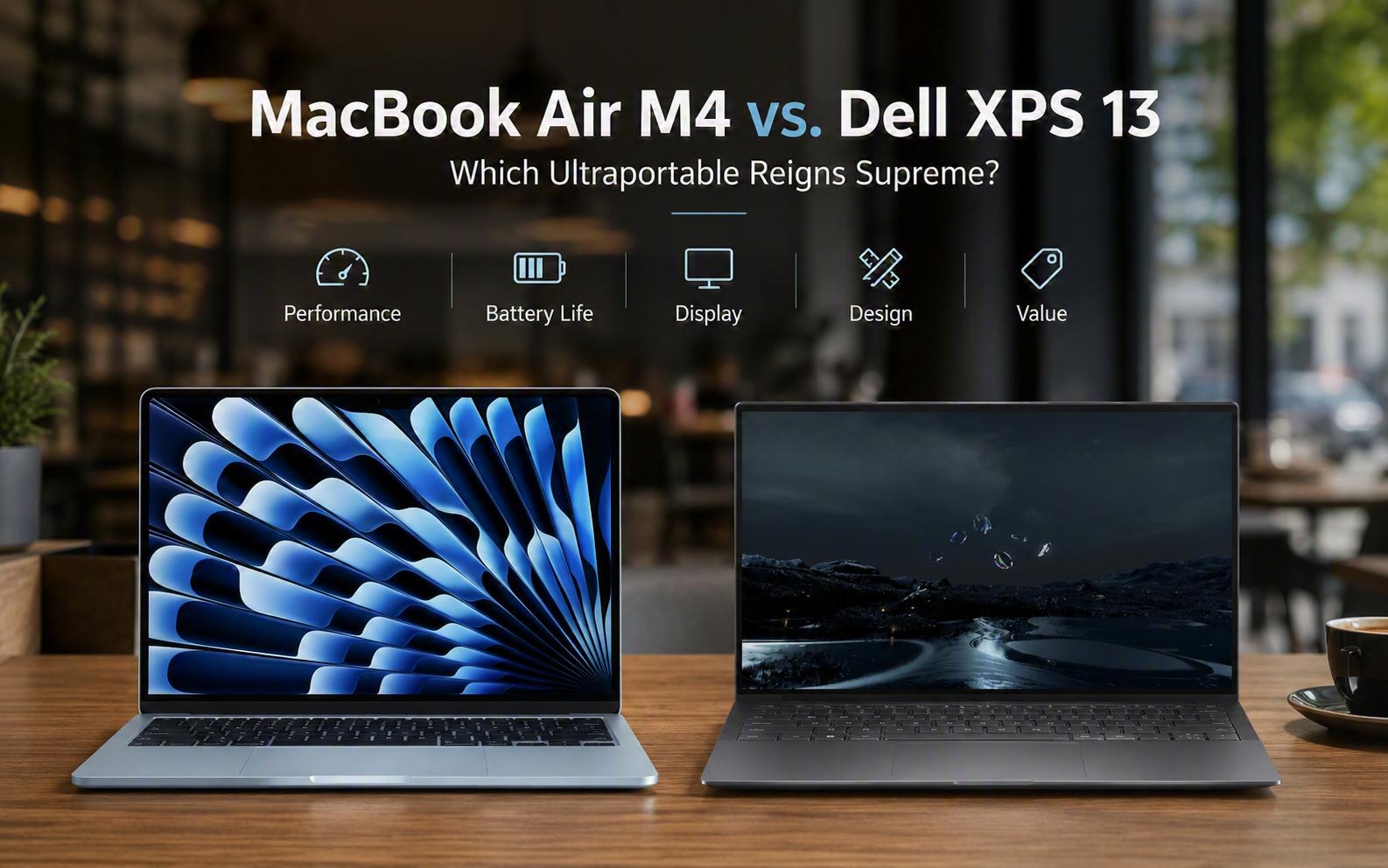
Choosing a premium laptop today often comes down to evaluating the latest MacBook Air M4 vs. Dell XPS 13. Indeed, this decision has become much more complex due to recent processor breakthroughs on both sides. Apple refined its ultraportable formula by introducing the powerful M4 chip into its thin, fanless machine. Conversely, Dell disrupted the Windows ecosystem by offering two distinct premium silicon options for its flagship laptop.
Microsoft also launched intense marketing campaigns to promote these Windows devices as superior MacBook competitors. This competitive pressure forces both Apple and Dell to innovate rapidly with every hardware generation. These aggressive advertisements directly target students and professional creators looking for maximum value. However, buyers prioritize real-world efficiency and software integration over simple benchmark scores. Both manufacturers now integrate dedicated neural engines to accelerate on-device machine learning tasks.
Additionally, prospective customers must assess how these physical designs handle sustained workloads. Severe thermal constraints can significantly degrade performance during extended video editing sessions or software compilation. Passive cooling elements remain completely silent but cannot dissipate heat as quickly as active fans. This analytical review examines every crucial functional metric of these leading premium devices. Smart shoppers must carefully evaluate these thermals to ensure sustained peak speeds during intense creative workflows.
Silicon Showdown: Apple M4 Meets Snapdragon and Intel
Specifically, the M4 chip inside the MacBook Air delivers breathtaking single-core performance during daily tasks. Benchmark results show its ten-core CPU easily handles heavy multitasking workloads without generating excessive heat. The system relies on a passively cooled design that operates in absolute silence at all times. To illustrate, the efficient architecture allows the processor to maintain high speeds during demanding visual rendering tasks. Users can enjoy a distraction-free environment even while running intensive software applications.
Meanwhile, the Dell XPS 13 offers either Intel Lunar Lake or Qualcomm Snapdragon X Elite processors. Therefore, buyers must choose between excellent x86 compatibility and elite multi-threaded performance based on their needs. Intel’s Core Ultra Series 2 chips offer superior graphics processing power that beats Qualcomm’s integrated Adreno GPU. The Snapdragon variant dominates heavy multi-core processing tasks thanks to its twelve physical Oryon cores. Professional content creators will appreciate this massive multi-core throughput during complex video compilation workflows.
Subsequently, running native Arm applications on Windows delivers outstanding processing speed and system responsiveness. Unoptimized software relies on emulation layers that can occasionally sap battery endurance and system performance. Apple’s mature M4 chip avoids these compatibility hurdles by using its highly refined Rosetta emulation technology. This seamless integration ensures that legacy applications run perfectly on macOS without frustrating user interventions.
Practical Design, Port Selection, and Input Methods
Furthermore, Apple maintains its iconic aluminum unibody chassis, which feels remarkably sturdy and premium. The lightweight machine measures only eleven millimeters thick and now comes in a stunning Sky Blue finish. Alternatively, buyers can choose traditional Midnight, Starlight, or Silver colorways to match their personal style. The laptop features a traditional keyboard with physical function keys and a spacious force-touch trackpad. The carefully designed keys provide exceptional travel and a satisfying tactile response for rapid typing speed.
| Feature | MacBook Air M4 | Dell XPS 13 |
|---|---|---|
| 🎧 3.5mm Headphone Jack | Included | Omitted |
| 🔌 Charging Port | MagSafe + 2x Thunderbolt | 2x USB4 |
| ⌨ Keyboard Type | Physical Function Keys | Zero-Lattice / Seamless |
| 🖱 Trackpad & Row | Force-Touch Trackpad | Haptic Glass & Capacitive Row |
In contrast, Dell uses an ultra-minimalist chassis that features a controversial zero-lattice keyboard with tightly packed keys. The flat wrist rest is made of glass and completely hides the haptic trackpad beneath it. As a result, some touch typists find the seamless keyboard deck quite difficult to navigate at first. The capacitive touch function row also lacks physical feedback, which frustrates some productivity-focused professional users. Many reviewers highlight this lack of tactile key boundaries as a major ergonomic challenge for writers.
In comparison, connectivity options on both machines are highly restrictive but favor the MacBook Air. Apple includes a dedicated MagSafe charging port, two Thunderbolt ports, and a physical headphone jack. Users can charge the laptop without sacrificing any of their high-speed accessory ports. Instead, Dell offers only two USB4 ports and completely omits the physical headphone jack from the XPS.
Display Technologies and Multimedia Experiences
Initially, buyers might favor Apple’s Liquid Retina screen for its sharp text and accurate colors. The thirteen-inch panel offers five hundred nits of brightness and supports one billion vibrant colors. Nevertheless, this display remains locked at a standard sixty hertz refresh rate, which feels ancient. This slow refresh rate can make scrolling through long documents feel less fluid during daily tasks. This high-resolution screen provides sharp images that make casual web browsing highly enjoyable for students.
Dell provides a fluid one hundred and twenty hertz variable refresh rate on its touchscreen. Customers can choose between a sharp QHD+ touchscreen panel and a spectacular tandem OLED touchscreen display. The tandem OLED panel uses layered displays to deliver perfect contrast and deep blacks. Similarly, the glossy finish helps colors pop off the screen to create highly immersive movie experiences. Creative professionals might prefer the XPS 13 screen for color-accurate video editing and visual work.
Both laptops feature distinct audio configurations to enhance the user’s entertainment and communication experiences. Apple implements a highly immersive four-speaker sound system that supports spatial audio and Dolby Atmos. Dell utilizes a robust quad-speaker setup with dedicated tweeters and woofers that emit loud sound. This comprehensive audio coverage is perfect for video calls and casual media consumption at home.
Battery Endurance and Thermal Performance
Naturally, battery efficiency represents a vital metric for any professional or student working on the move. The MacBook Air easily delivers around sixteen hours of continuous wireless web browsing on a charge. Users can comfortably leave their bulky power adapters at home during a typical workday. Apple’s optimized software allows the fanless machine to minimize idle battery drain when closed. This high efficiency ensures that the battery level remains remarkably stable even after days of standby. This highly reliable sleep behavior represents a massive advantage for workers who move between offices constantly.
Nonetheless, the Dell XPS 13 Snapdragon configuration achieves an even more impressive twenty-hour battery life. The Intel Lunar Lake option is slightly more power-hungry but still endures for seventeen hours. Both of these premium laptops set new endurance benchmarks that easily outclass older Windows machines. A direct comparison of their core specifications in the following table highlights these key physical differences. For instance, the Qualcomm model maintains outstanding standby battery and runs completely silent during basic web tasks. This comprehensive data highlights the essential hardware specifications of both leading ultraportable systems.
These numbers demonstrate how efficiently these competing architectures translate raw power into prolonged utility. Apple relies on its custom second-generation three-nanometer process to maximize performance per watt of electricity. Dell matches this advancement by leveraging cutting-edge node optimizations from major external semiconductor foundries. These engineering decisions ensure that active fans rarely spin up during routine productivity tasks.
| Specification | MacBook Air M4 | Dell XPS 13 |
| Starting Price | 999 Dollars | 699 Dollars |
| Processor | Apple M4 Chip | Intel Lunar Lake |
| Base Memory | 16GB Unified RAM | 8GB LPDDR5x RAM |
| Audio Support | 3.5mm Headphone Jack | Not Included |
MacBook Air M4 vs. Dell XPS 13
Finally, budget considerations and corporate ecosystem strategy will likely play the most decisive role in any purchase. The MacBook Air starts at nine hundred and ninety-nine dollars with sixteen gigabytes of unified memory. Likewise, Apple’s recent strategy aims to establish macOS as the premier platform for local artificial intelligence. This local security keeps sensitive data safe from potential cloud breaches and online tracking tools. The fast M4 Neural Engine runs large language models smoothly on device with complete privacy.
The flagship Dell XPS 13 models start at a slightly higher retail price point. Dell recently launched an accessible model starting at six hundred and ninety-nine dollars in mid-2026. This affordable version features a Core Series 3 chip and targets back-to-school students looking for value. For example, students can easily configure their chosen system with various processing and display options online. Ultimately, buyers should choose the MacBook Air for reliable daily performance or the XPS 13 for futuristic hardware.
Thus, both companies are fighting hard to win over price-sensitive consumers with these strong hardware portfolios. The sudden influx of budget-friendly ultraportables has completely reshaped the landscape for premium educational laptops. Apple will likely feel pressured to introduce cheaper alternatives if Dell continues to lower starting prices. This high-stakes technological standoff benefits the average consumer by driving innovation and affordability across the industry.
Support Our Work
Help us keep creating and maintaining our projects. We appreciate your support!
Ways to contribute:
Shop via Affiliate LinksSupport us at no extra cost to you while you shop.
Support on Ko-fiBuy us a coffee to keep the engine running!




Leave a Reply