
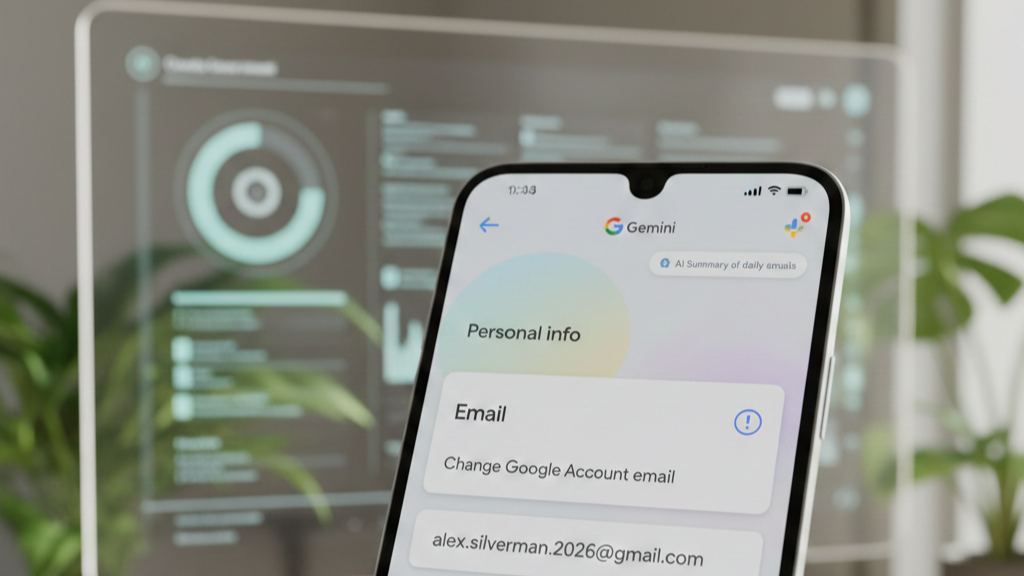
In a historic shift for digital identity, Google has finally introduced the ability to change a Gmail address. This monumental update arrived in January 2026, marking a significant departure from decades of rigid account structures. For twenty years, users remained tethered to the usernames they chose during the early days of the internet. Now, the tech giant provides a streamlined path for users to refresh their online presence without losing data.

The Dawn of the Flexible Gmail Address
For the first time since 2004, Google allows users to swap their primary @gmail.com identifier for a new one. Previously, changing an email meant creating an entirely new account and manually migrating thousands of messages and files. This process was notoriously difficult and often led to the loss of precious digital memories. However, the new system integrates the change directly into the existing account framework, ensuring a seamless transition for millions.
The rollout began globally on January 17, 2026, following successful pilot tests in specific regions like India. Consequently, users can now navigate to their account settings to claim a more professional or relevant username. This flexibility is especially vital for those who created accounts in their youth with now-embarrassing names. Furthermore, it serves individuals who have undergone legal name changes or those seeking better privacy through a less identifiable handle.
How the Gmail Address Change Works
The mechanics of this update are designed to prevent the common “breaking” of digital services that usually follows an email change. When a user selects a new Gmail address, their original address does not simply disappear into the void. Instead, the old address becomes an automatic alias tied to the same primary inbox. Because of this, any emails sent to the former address will still arrive safely in the user’s main folder.
- Alias Integration: Both the old and new addresses function as valid login credentials for Google services.
- Data Preservation: Every photo in Google Photos and every document in Drive remains untouched during the swap.
- Security Lock: Once a change is made, the old address is permanently “locked” to that account.
- Anti-Squatting: This prevents bad actors from claiming abandoned addresses to impersonate the original owner.
To access this feature, users must visit the “Personal info” section of their Google Account dashboard. Under the “Email” card, an option to “Change Google Account email” will appear if the feature has reached their account. Users must then enter a unique, unused username and confirm the selection through a series of verification steps.
Policy Constraints and Limitations
While the update offers new freedom, Google has implemented strict guardrails to maintain platform stability and prevent abuse. Specifically, users can only change their primary Gmail address once every 12 months. Moreover, there is a lifetime limit of three total changes per account to discourage “username hopping.” These rules ensure that the system remains a tool for genuine identity updates rather than a playground for spammers.
Additionally, the transition is not entirely without minor technical hiccups. Google warns that some third-party sites using “Sign in with Google” might not immediately recognize the new primary identifier. Similarly, certain local device settings, such as those on a Chromebook, may require the user to re-add their account. Despite these small hurdles, the core Google ecosystem—including YouTube, Maps, and the Play Store—updates almost instantaneously.
Enhanced Security and the “Shielded Email” Vision
Beyond mere convenience, this update represents a significant leap forward in personal cybersecurity. Experts note that refreshing an email address can drastically reduce exposure to “zombie” spam and outdated marketing databases. By moving to a new primary address, users can effectively “reset” their digital footprint while keeping their old address as a secondary layer.
In tandem with this launch, Google has teased the upcoming “Shielded Email” feature for later in 2026. This system will allow users to generate temporary, disposable aliases for one-time sign-ups on suspicious websites. Consequently, the primary Gmail address stays hidden from potential data breaches and aggressive trackers. This multi-layered approach to identity management places Gmail at the forefront of privacy-centric email providers.
The Death of POP and the Rise of IMAP
As Gmail moves toward a more integrated future, it is also shedding legacy technologies that pose security risks. Starting in late January 2026, Google will officially discontinue support for “Gmailify” and POP (Post Office Protocol) fetching. These older methods allowed users to pull emails from third-party accounts into their Gmail inbox via the browser version. However, they lack the robust security headers required by modern encryption standards.
Instead, Google is pushing users toward the IMAP standard and the official Gmail mobile apps. Unlike the aging POP system, IMAP offers a two-way sync that keeps folders organized across multiple devices. This shift ensures that all communications passing through the Gmail interface benefit from Google’s advanced AI-powered spam filters. While some power users may find the transition jarring, the move is a necessary step to protect accounts from credential harvesting.
AI Integration: Gemini Becomes Your Inbox Partner
The Gmail experience in 2026 is no longer just about sending and receiving text. It is now deeply intertwined with Gemini, Google’s sophisticated artificial intelligence. Recently, several high-end AI features were made free for all personal account holders. These tools transform the inbox from a static list of messages into a proactive personal assistant.
- Help Me Write: This tool can draft entire emails based on a simple prompt, complete with tone adjustments.
- AI Summaries: For long, rambling email threads, Gemini provides a bulleted list of key points and action items.
- Suggested To-Dos: The AI identifies bills and appointments within emails and automatically suggests calendar entries.
- Contextual Replies: New “Suggested Replies” go beyond “Thanks!” by analyzing the specific questions asked in the message.
These AI tools are not just fancy add-ons; they are becoming the default way users interact with their mail. By January 2026, the “AI Inbox” view has become a standard option, offering a summary of the day’s priorities. This allows users to stay informed without ever opening individual messages, saving hours of manual sorting.
The Global Impact on Digital Identity
The ability to change a Gmail address fundamentally alters how we view our digital “permanent records.” For years, an email address was seen as a static anchor, much like a social security number. Now, it has become a flexible asset that can evolve with a person’s career and personal life. As we move further into 2026, the distinction between our digital and physical identities continues to blur.
In summary, the recent changes to Gmail addresses represent a “great refresh” for the internet’s most popular mail service. By combining identity flexibility with aggressive security updates and AI empowerment, Google has modernized the foundation of online communication. Users are no longer trapped by their past choices, yet they remain protected by the most advanced defenses ever built for an inbox.
Helpful Resources and Sources About Gmail Address Change
- Official Google Account Email Support Page
- Google Workspace Updates – January 2026 Recap
- 9to5Google: How to Change Your Gmail Address
- Cybersecurity News: Gmail Address Change Rollout Details
- PCMag: Guide to Ditching Your Old Gmail Address
Big Gmail Change! You Can Now Rename Your Account Without Losing Data
This video explains how the new rename feature works and how your old address remains linked as an alias to prevent data loss.





Leave a Reply