
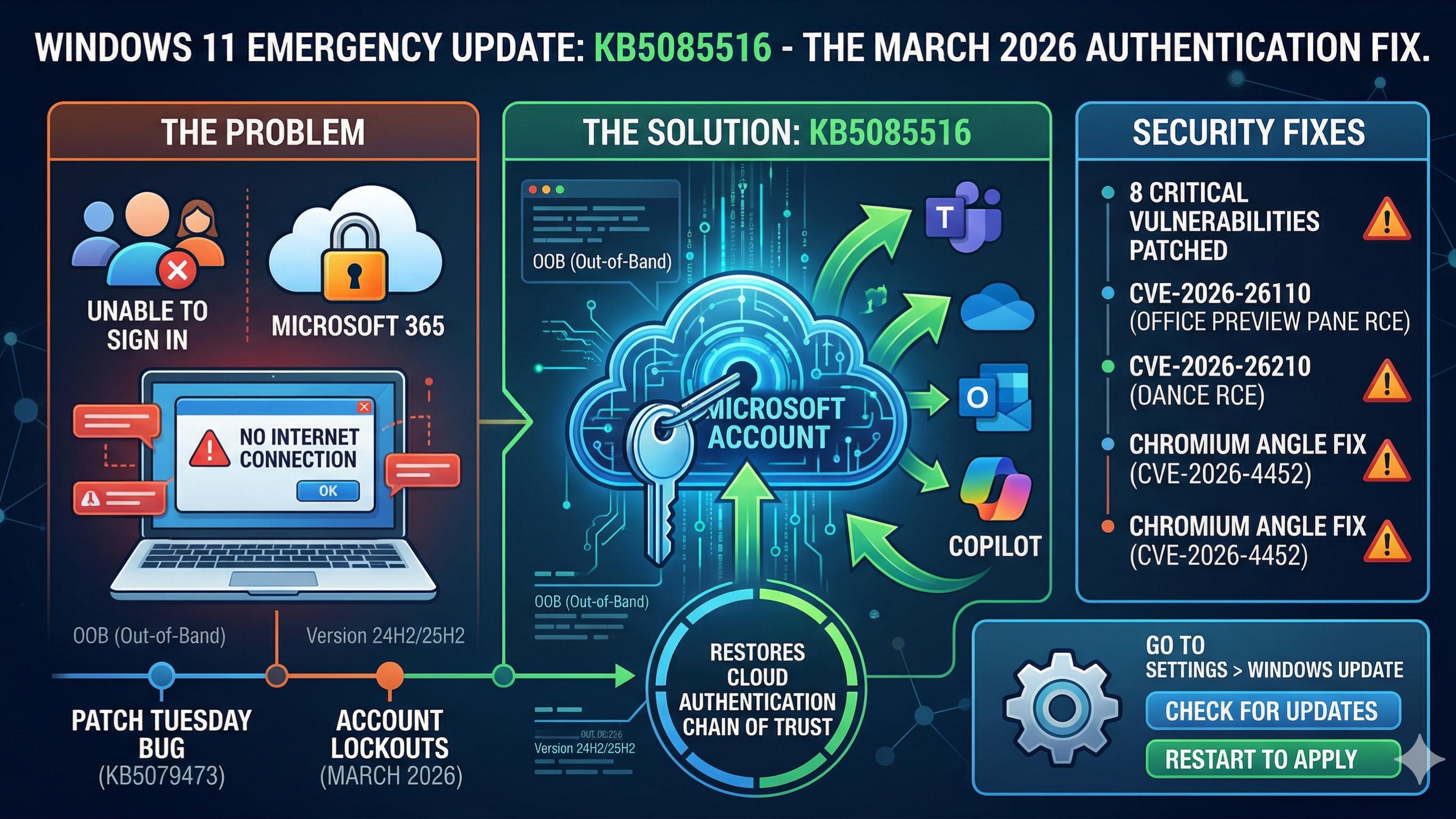
Technology often moves with a rhythmic, predictable pulse that users rarely notice. However, that rhythm shattered on March 21, 2026, when Microsoft issued a sudden alert: Microsoft Windows Emergency Update. The software giant released an emergency out-of-band (OOB) update to fix a critical breakage. This was not a scheduled maintenance task or a minor feature tweak. Instead, it was a high-stakes rescue mission for millions of Windows 11 users worldwide.
Earlier in the month, the standard “Patch Tuesday” release had also introduced a devastating bug. While that update aimed to close 84 security vulnerabilities, it unintentionally broke account authentication. Consequently, users found themselves locked out of essential tools like Microsoft Teams, OneDrive, and Outlook. The irony was palpable because the security fix effectively secured users away from their own data.

The Anatomy of a Digital Lockout
The trouble began immediately after the installation of the initial March security update, known as KB5079473. This package was supposed to be a shield against remote code execution and privilege escalation. Unfortunately, the shield also acted as a wall for Microsoft Account (MSA) sign-ins. Users across the globe started reporting a bizarre and frustrating error message.
“You’ll need the Internet for this. It doesn’t look like you’re connected to the Internet.”
This message appeared even when devices had perfectly stable fiber or Wi-Fi connections. Because the operating system failed to validate credentials, cloud-dependent features simply stopped functioning. Productivity hit a standstill as Microsoft 365 Copilot and Excel spreadsheets refused to sync. For many, the “modern workplace” suddenly felt like a disconnected island.
Why the Windows Emergency Update Matters
Microsoft typically prefers to bundle fixes into a monthly cycle to maintain stability. Nevertheless, the severity of this authentication “blackout” demanded an immediate, out-of-cycle response. The new emergency update, labeled KB5085516, arrived just 11 days after the original breakage.
This specific patch targets Windows 11 versions 24H2 and 25H2. It represents a “targeted repair” rather than a broad feature overhaul. By deploying this fix, Microsoft aimed to restore the “chain of trust” between the local PC and the Azure-backed cloud. Without this link, the sophisticated AI features of 2026 are essentially useless.
The Vulnerability Landscape of March 2026
While the sign-in bug stole the headlines, the underlying security landscape remained treacherous. The March 2026 cycle addressed a staggering eight “Critical” vulnerabilities. Among these were several flaws that allowed for “zero-click” exploitation. This means an attacker could compromise a system without the user ever clicking a link.
One of the most dangerous flaws involved the Microsoft Office Preview Pane. Specifically, CVE-2026-26110 allowed malicious code to run just by viewing a file. You did not even have to open the document to become a victim. This type of vulnerability is a nightmare for corporate environments where file sharing is constant.
| Vulnerability ID | Impact Type | Severity | Affected Product |
| CVE-2026-26110 | Remote Code Execution | Critical | Microsoft Office |
| CVE-2026-26113 | Remote Code Execution | Critical | Microsoft Office |
| CVE-2026-21536 | Remote Code Execution | Critical | Pricing Program |
| CVE-2026-26144 | Information Disclosure | Critical | Microsoft Excel |
| CVE-2026-21262 | Elevation of Privilege | Important | SQL Server |
The “Silent” Threat: Chromium and ANGLE
Beyond the core Windows OS, another emergency unfolded within the browser engine. Microsoft Edge, which shares the Chromium foundation, required an urgent update for CVE-2026-4452. This flaw resided in the ANGLE graphics translation layer.
Because ANGLE sits between web content and your GPU, it is a high-value target. A remote attacker could use a specially crafted webpage to trigger “heap corruption.” Essentially, your graphics card could be tricked into letting an outsider take control. Microsoft acted quickly to sync these fixes with the broader Windows emergency rollout.
How to Navigate the Patching Process of Microsoft Windows Emergency Update
For the average user, the best advice is to let the automation work. Microsoft confirmed that KB5085516 will install automatically for most devices. However, if you are currently experiencing sign-in errors, you should not wait. You can manually trigger the update through the “Windows Update” settings menu.
- Open Settings on your Windows 11 device.
- Click on the Windows Update tab in the sidebar.
- Select the Check for updates button.
- Look for KB5085516 and ensure it downloads completely.
- Restart your device to finalize the authentication repair.
For IT administrators, the challenge is slightly more complex. They must balance the need for security with the risk of further “regressions.” A regression is a fancy term for when a fix breaks something else. Consequently, many firms are testing the emergency patch on “pilot groups” first.
A Unique Look at the “New Normal”
The events of March 2026 highlight a shift in how we view operating systems. In the past, Windows was a self-contained box of software on your desk. Today, it is a living portal to a vast network of AI and cloud services. When the portal breaks, the computer becomes little more than an expensive paperweight.
Microsoft’s rapid response shows they understand this new dependency. They cannot afford to let the “Copilot era” be defined by connectivity failures. Therefore, the “Emergency Update” is more than just code; it is a promise. It is a promise that your digital workspace will remain open for business.
Microsoft Windows Emergency Update: Looking Ahead to April
As the dust settles on this emergency, the tech community looks toward the next cycle. Microsoft has already teased a major update for late April 2026. This upcoming release promises a faster File Explorer and a more streamlined Copilot interface.
However, the lesson of March is clear: speed must not come at the cost of stability. Every line of code added to secure the system carries the risk of a new bug. For now, users can breathe a sigh of relief as their apps start syncing again. The digital fire has been extinguished, but the watchers remain on high alert.




Leave a Reply